Master Deployment
We recommend deploying the Master via Docker! Direct installation on the host is not recommended.
You have three deployment options—choose one.
After deployment, there is no default user. The first registered user becomes the administrator. For security, multi-user registration is disabled by default.
By default, the program stores data in its working directory. To change this, see the configuration reference.
Important: If you want to deploy the Master and have it also act as a Server, remember to configure the default server in the Web UI after starting the Master.
Prerequisites
Open the following ports on your server:
- WEB UI port: TCP 9000
- RPC port: TCP 9001
- frps API port: any free port (example uses TCP/UDP 7000)
- frps service ports: any port range (example uses TCP/UDP 26999–27050)
If you use a reverse proxy, you can ignore WEB UI and RPC ports—just open 80/443.
- The WEB UI port can also accept h2c RPC connections.
- The RPC port can also accept self-signed HTTPS API connections.
- Both can be fronted by a TLS-terminating reverse proxy.
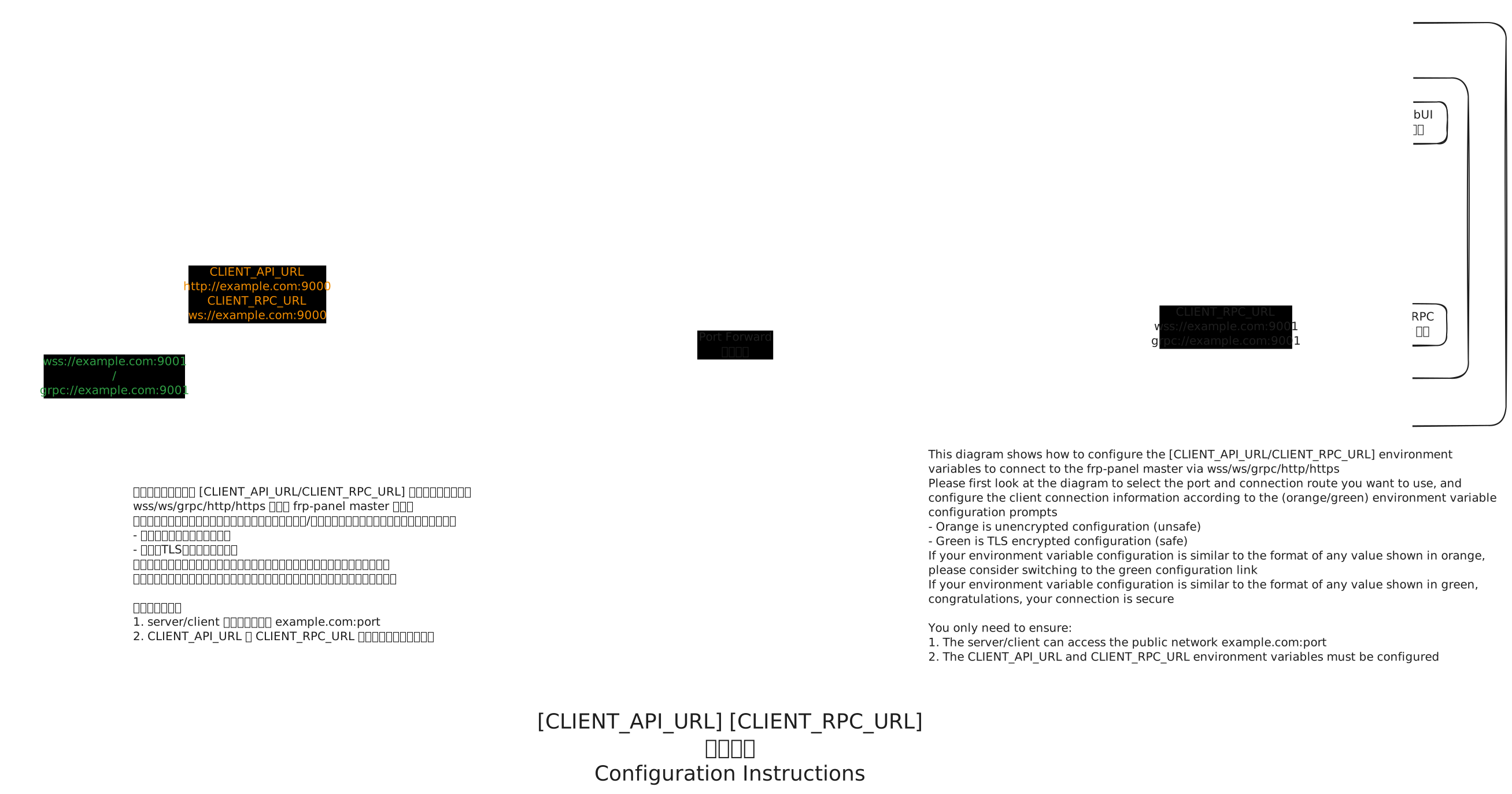
To secure communication (via reverse proxy), refer to the diagram below to set the environment variables CLIENT_RPC_URL and CLIENT_API_URL.
Note⚠️: First deploy successfully using the regular method! Then adjust these two variables!!!!
Orange indicates insecure, green indicates secure. You need to ensure both environment variables are set for proper operation.
To test if a port (e.g. 8080) is open, run on the server:
shellpython3 -m http.server 8080Then from another host:
shellcurl http://SERVER_IP:8080 -IA successful response looks like:
HTTP/1.0 200 OK
Server: SimpleHTTP/0.6 Python/3.11.0
Date: Sat, 12 Apr 2025 17:12:15 GMT
Content-type: text/html; charset=utf-8
Content-Length: 8225
Deploying on Linux
Option 1: Docker Compose
Install Docker and Docker Compose, then create docker-compose.yaml:
services:
  frpp-master:
    image: vaalacat/frp-panel:latest
    network_mode: host
    environment:
      APP_GLOBAL_SECRET: your_secret # Enter some random characters, do not leak
      MASTER_RPC_HOST: 1.2.3.4 # Server's external IP or domain
      MASTER_RPC_PORT: 9001 # RPC listening port
      MASTER_API_HOST: 1.2.3.4 # Server's external IP or domain
      MASTER_API_PORT: 9000 # API/WebUI listening port
      # Set CLIENT_RPC_URL and CLIENT_API_URL according to actual situation, set as URLs accessible from outside to master
      # Client connects to master RPC URL, if using reverse proxy, set to the URL accessible through reverse proxy (e.g. wss://example.com:443)
      CLIENT_RPC_URL: grpc://1.2.3.4:9001
      # Client connects to master API/WebUI URL, if using reverse proxy, set to the URL accessible through reverse proxy (e.g. https://example.com:443)
      CLIENT_API_URL: http://1.2.3.4:9000
    volumes:
      - ./data:/data # Data storage location
    restart: unless-stopped
    command: master
Option 2: Docker CLI
Install Docker. We recommend host network mode:
# Recommended
# Change MASTER_RPC_HOST 0.0.0.0 to your server's external IP
# APP_GLOBAL_SECRET should not be leaked, client and server secrets are generated by Master
# Set CLIENT_RPC_URL and CLIENT_API_URL according to actual situation
# If using reverse proxy, set to the URL accessible through reverse proxy, i.e. how to access master from outside
# e.g. if port 443 proxies example.com to port 9000
# CLIENT_RPC_URL=wss://example.com:443
# CLIENT_API_URL=https://example.com:443
docker run -d \
  --network=host \
  --restart=unless-stopped \
  -v /opt/frp-panel:/data \
  -e APP_GLOBAL_SECRET=your_secret \
  -e MASTER_RPC_HOST=0.0.0.0 \
  -e CLIENT_RPC_URL=grpc://0.0.0.0:9001 \
  -e CLIENT_API_URL=http://0.0.0.0:9000 \
  vaalacat/frp-panel
If you cannot use host network mode, refer to the command below:
# Alternative
# Remove Chinese comments when running
# Set CLIENT_RPC_URL and CLIENT_API_URL according to actual situation, set as URLs accessible from outside to master
# If using reverse proxy, set to the URL accessible through reverse proxy, i.e. how to access master from outside
docker run -d -p 9000:9000 \ # API console port
  -p 9001:9001 \ # rpc port
  -p 7000:7000 \ # frps port
  -p 27000-27050:27000-27050 \ # Reserved ports for frps
  --restart=unless-stopped \
  -v /opt/frp-panel:/data \ # Data storage location
  -e APP_GLOBAL_SECRET=your_secret \ # Master's secret, do not leak, client and server secrets are generated by Master
  -e MASTER_RPC_HOST=0.0.0.0 \ # Change this to your server's external IP
  -e CLIENT_RPC_URL=grpc://0.0.0.0:9001 \
  -e CLIENT_API_URL=http://0.0.0.0:9000 \
  vaalacat/frp-panel
Option 3: Docker + Reverse-Proxy TLS Deployment
Here we use Traefik as an example
Traefikcan automatically detect Docker container ports in real-time and hot-reload configurations, making it ideal for Docker service reverse proxying
First, create a Docker network named traefik for reverse proxy use:
docker network create traefikThen start the reverse proxy and Master service
docker-compose.yaml
version: '3'

services:
  traefk-reverse-proxy:
    image: traefik:v3.3
    restart: unless-stopped
    networks:
      - traefik
    command:
      - --entryPoints.web.address=:80
      - --entryPoints.websecure.address=:443
      - --entryPoints.websecure.http2.maxConcurrentStreams=250
      - --providers.docker
      - --providers.docker.network=traefik
      - --api.insecure # Remove this line in production
    # Use port 80 for ACME HTTP DNS certificate validation
      - --certificatesresolvers.le.acme.email=me@example.com
      - --certificatesresolvers.le.acme.storage=/etc/traefik/conf/acme.json
      - --certificatesresolvers.le.acme.httpchallenge=true
    ports:
      # Reverse proxy HTTP port
      - "80:80"
      # Reverse proxy HTTPS port
      - "443:443"
      # Traefik Web UI (--api.insecure=true uses this port)
      # Remove this port in production
      - "8080:8080"
    volumes:
      # Mount docker.sock so Traefik can automatically detect all docker container reverse proxy configurations on the host
      - /var/run/docker.sock:/var/run/docker.sock
      # Save certificates obtained by Traefik
      - ./conf:/etc/traefik/conf

  frpp-master:
    image: vaalacat/frp-panel:latest # Change to the version you want to use
    environment:
      APP_GLOBAL_SECRET: your_secret
    # Because api and rpc use different protocols
    # We need to use two domains for api and rpc
    # So that the reverse proxy can correctly identify the protocol to forward
      MASTER_RPC_HOST: frpp.example.com
      MASTER_API_PORT: 443
      MASTER_API_HOST: frpp.example.com
      MASTER_API_SCHEME: https
      CLIENT_RPC_URL: wss://frpp.example.com:443
      CLIENT_API_URL: https://frpp.example.com:443
    networks:
      - traefik
    volumes:
      - ./data:/data
    ports:
    # No need to reserve api and rpc ports for master
    # Reserve frps api port
      - 7000:7000
      - 7000:7000/udp
    # Reserve frps service ports
    # Port 26999 is reserved for frps HTTP proxy
      - 26999-27050:26999-27050
      - 26999-27050:26999-27050/udp
    restart: unless-stopped
    command: master
    labels:
    # API/WSS
      - traefik.http.routers.frp-panel-api.rule=Host(`frpp.example.com`)
      - traefik.http.routers.frp-panel-api.tls=true
      - traefik.http.routers.frp-panel-api.tls.certresolver=le
      - traefik.http.routers.frp-panel-api.entrypoints=websecure
      - traefik.http.routers.frp-panel-api.service=frp-panel-api
      - traefik.http.services.frp-panel-api.loadbalancer.server.port=9000
      - traefik.http.services.frp-panel-api.loadbalancer.server.scheme=http
      # If you don't need frps HTTP proxy below, you can omit this
      # You need to configure wildcard DNS *.frpp.example.com to point to your server's public IP
      # This enables using domains ending with .frpp.example.com on port 443 to forward multiple services to multiple frpc
      - traefik.http.routers.frp-panel-tunnel.rule=HostRegexp(`.*.frpp.example.com`)
      - traefik.http.routers.frp-panel-tunnel.tls.domains[0].sans=*.frpp.example.com
      - traefik.http.routers.frp-panel-tunnel.tls=true
      - traefik.http.routers.frp-panel-tunnel.tls.certresolver=le
      - traefik.http.routers.frp-panel-tunnel.entrypoints=websecure
      - traefik.http.routers.frp-panel-tunnel.service=frp-panel-tunnel
      - traefik.http.services.frp-panel-tunnel.loadbalancer.server.port=26999
      - traefik.http.services.frp-panel-tunnel.loadbalancer.server.scheme=http
networks:
  traefik:
    external: true
    name: traefik
After the above docker-compose.yaml is deployed, you can visit SERVER_IP:8080 to view the reverse proxy status.
Then configure the default server to enable frp subdomain forwarding:
| Configuration | Value |
|---|---|
| FRPs listen port | 7000 |
| FRPs listen address | 0.0.0.0 |
| Proxy listen address | 0.0.0.0 |
| HTTP listen port | 26999 |
| Domain suffix | frpp.example.com |
Deploying on Windows
Direct Execution
In the same folder as the downloaded executable, create a .env file (note: no file extension), then enter the following content, save, and run the corresponding command:
APP_GLOBAL_SECRET=your_secret
DB_DSN=data.db
CLIENT_RPC_URL=grpc://IP:9001
CLIENT_API_URL=http://IP:9000- master:
frp-panel-amd64.exe master